Bundle 32-Bit and 64-Bit of all WSCC tools
-
About WSCC
I am using WSCC (Windows System Control Center) to download and update the following tools:
- MiTeC Utilities
- NirSoft Utilities
- Other Utilities
- Sysinternals Suite
At the download site of WSCC the portable versions are offered on top, installers are offered below the portable versions.
I am also using the portable version of WSCC.
Set-Up of WSCC
When you extract the portable version to any folder and start it, then a Wizard shown, that helps users setting WSCC up correctly.
In the first step you can select, what tools you want to install:
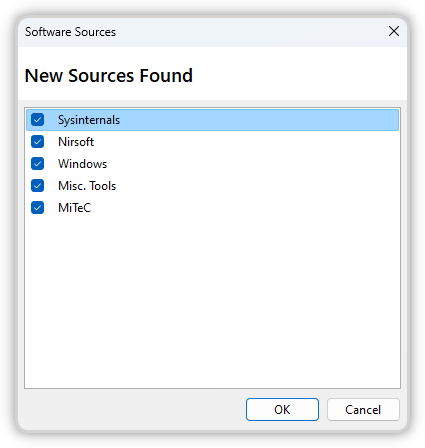
For each tool set (like Sysinternals Suite) you can select various options (lie the installation path):
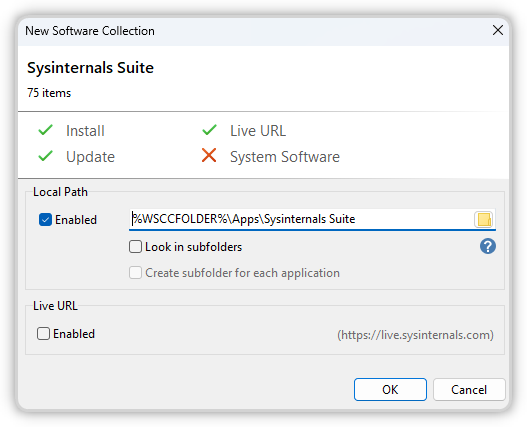
The default folders for the tools are:
%WSCCFOLDER%\Apps\MiTeC Utilities
%WSCCFOLDER%\Apps\NirSoft Utilities
%WSCCFOLDER%\Apps\Other Utilities
%WSCCFOLDER%\Apps\Sysinternals Suite
For the MiTeC Utilities, the NirSoft Utilities and also the Other Utilities you can also define, if
- only the 32-Bit version should be installed (default option)
- only the 64-Bit version should be installed
- both versions (32-Bit and 64-Bit) should be installed
Default Settings
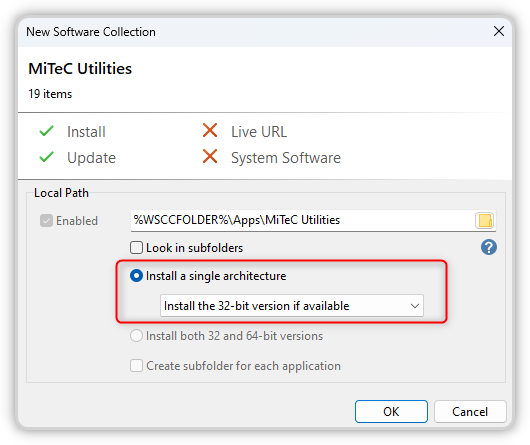
My Settings
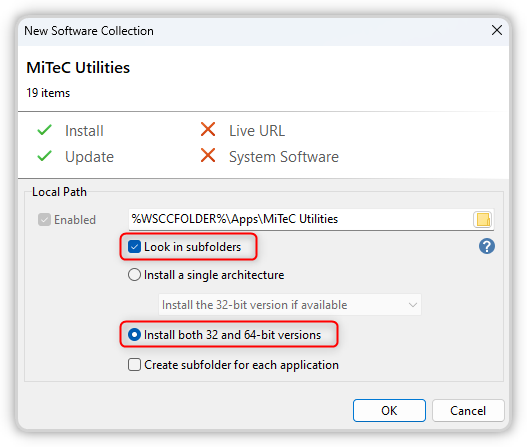
I selected to install both versions (32-Bit and 64-Bit) support VulnDetect.
Bundle MiTeC Utilities
The 32-Bit version and also the 64-Bit version of the MiTeC Utilities are all stored in the same folder.
Here only the following two applications have a 32-Bit version and also a 64-Bit version:%WSCCFOLDER%\Apps\MiTeC Utilities\NetScanner.exe %WSCCFOLDER%\Apps\MiTeC Utilities\NetScanner64.exe %WSCCFOLDER%\Apps\MiTeC Utilities\XMLView.exe %WSCCFOLDER%\Apps\MiTeC Utilities\XMLView64.exeIt should be easy to bundle them with one rule:
%WSCCFOLDER%\Apps\MiTeC Utilities\{Application}.exe
%WSCCFOLDER%\Apps\MiTeC Utilities\{Application}64.exe
Please consider, that in the future some more MiTeC tools might have both versions!
Bundle NirSoft Utilities
The 32-Bit version of the NirSoft Utilities are placed in the folder:
%WSCCFOLDER%\Apps\NirSoft UtilitiesThe 64-Bit version of the NirSoft Utilities are placed in the sub-folder "\x64":
%WSCCFOLDER%\Apps\NirSoft Utilities\x64Here some examples:
%WSCCFOLDER%\Apps\NirSoft Utilities\AppReadWriteCounter.exe
%WSCCFOLDER%\Apps\NirSoft Utilities\x64\AppReadWriteCounter.exe

%WSCCFOLDER%\Apps\NirSoft Utilities\DevManView.exe
%WSCCFOLDER%\Apps\NirSoft Utilities\x64\DevManView.exe
It should be easy to bundle them with one rule:
%WSCCFOLDER%\Apps\NirSoft Utilities\{Application}.exe
%WSCCFOLDER%\Apps\NirSoft Utilities\x64\{Application}.exe
Bundle Other Utilities
The 32-Bit version of the Other Utilities are placed in the folder:
%WSCCFOLDER%\Apps\Other UtilitiesThe 64-Bit version of the Other Utilities are placed in the sub-folder "\x64":
%WSCCFOLDER%\Apps\Other Utilities\x64Here some examples:
%WSCCFOLDER%\Apps\Other Utilities\Everything.exe
%WSCCFOLDER%\Apps\Other Utilities\x64\Everything.exe

%WSCCFOLDER%\Apps\Other Utilities\putty.exe
%WSCCFOLDER%\Apps\Other Utilities\x64\putty.exe

%WSCCFOLDER%\Apps\Other Utilities\SumatraPDF.exe
%WSCCFOLDER%\Apps\Other Utilities\x64\SumatraPDF.exe
It should be easy to bundle them with one rule:
%WSCCFOLDER%\Apps\Other Utilities\{Application}.exe
%WSCCFOLDER%\Apps\Other Utilities\x64\{Application}.exe
Bundle Sysinternals Suite
The tools of the Sysinternals Suite are already bundled,
Means: when you expand the Sysinternals Suite, then you see each tool only once.The only exception here is the tool Sysinternals RegDelNull, that is listed twice:
C:\PortableApps\PortableApps\_WSCCPortable\Apps\Sysinternals Suite\RegDelNull.exe C:\PortableApps\PortableApps\_WSCCPortable\Apps\Sysinternals Suite\RegDelNull64.exe@Tom This is a issue, that sould be fixed!

Hello! It looks like you're interested in this conversation, but you don't have an account yet.
Getting fed up of having to scroll through the same posts each visit? When you register for an account, you'll always come back to exactly where you were before, and choose to be notified of new replies (either via email, or push notification). You'll also be able to save bookmarks and upvote posts to show your appreciation to other community members.
With your input, this post could be even better 💗
Register Login