Zoom - Uninstall with the Clean Zoom Uninstaller
-
Zoom has published a tool to help tidying unwanted Zoom installations.
You can download the Zoom Uninstaller from here:
https://stream.vulndetect.com/e/CleanZoom.exeThe following switches are available when running the installer:
MSI option | Description
- /silent - Removes Zoom silently.
- /keep_outlook_plugin - Removes Zoom, but leaves the Outlook Plugin installed.
- /keep_lync_plugin - Removes Zoom, but leaves the Lync/Skype for Business Plugin installed.
- /keep_notes_plugin - Removes Zoom, but leaves the Notes Plugin installed.
- /vdi_clean - Removes the VDI package.
Note: Use of the clean uninstaller will completely remove the Zoom client, as well as the Zoom plugin for Outlook. The Outlook add-in, Chrome/Firefox extensions, and the GSuite add-on are unaffected.
-
Enter a title e.g. "Zoom Uninstall"
-
Select the uninstall executable: CleanZoom.exe
-
Enter the silent Argument: /silent
Optionally configure the uninstall using the parameters mentioned above:
- Enter Installer Arguments: /silent /keep_outlook_plugin"
And then click "Save".
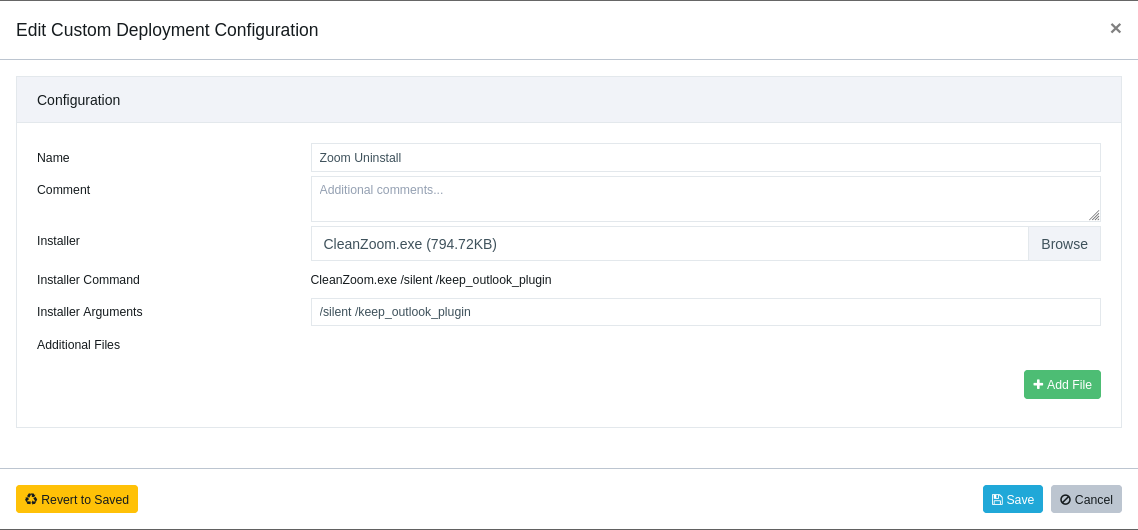
The dialogue will now upload the files to the VulnDetect backend.After saving the Job, you can now select to deploy it to groups or hosts.
Remember to inspect the host or group, if you want the job to run right away, else it'll apply after the next scheduled inspection.
After the Job is "Completed" on a host, VulnDetect will automatically conduct a new inspection and update the results for each host:
https://corporate.vulndetect.com/#/deployment/activityAnd you should be able to find the updated results on the hosts or applications page moments later.


Hello! It looks like you're interested in this conversation, but you don't have an account yet.
Getting fed up of having to scroll through the same posts each visit? When you register for an account, you'll always come back to exactly where you were before, and choose to be notified of new replies (either via email, or push notification). You'll also be able to save bookmarks and upvote posts to show your appreciation to other community members.
With your input, this post could be even better 💗
Register Login